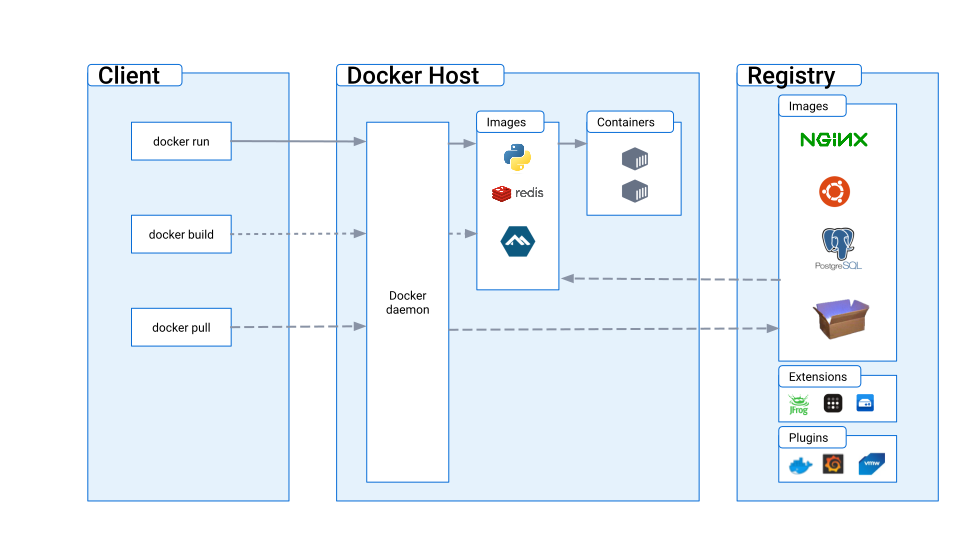
- What are containers?
- Which problem solve?
- Architecture
- How are implemented?
- What containers isn’t?
- Creating a container using Rust.
As Virtual Machines, containers are designed to provide isolated enviroment to run an application, but the main difference is that Virtual Machines create a new kernel possibly with a new architecture, while containers reuse the same kernel.
Limiting Processes
Cgroups namespaces
Why containers isn’t a virtualization model?
Virtual Machines emulate a whole machine, Containers just put the process into a namespace but use the same machine for that, they basically just “hide” everything from the process since network, clocks from system, users and groups etc. In that way the process will really think that he is in another machine. In practice “Container” is a name given to a process running without the same accesses that the other processes in the OS have.
Isolating
Resources:
- Memory
- CPU
- Network
Code
So let’s begin to create our own minimal container with Rust.
First we need to install the libc library to handle C code inside rust.
extern crate libc;
use libc::{c_void, c_char};
use std::ffi::CString;
use std::ptr;
with libc we can use fork() to create a new child process.
fn main() {
  match unsafe { libc::fork() } {
    -1 => eprintln!("Fork failed"),
    0 => {
      // here we will proceed to creation of the container
    }
  }
}
Now we want to isolate this child process from the parent processes’s filesystem and hostname settings. So we will use libc::unshare() to unshare the CLONE_NEWNS and CLONE_NEWUTS namespaces. To learn more about these namespaces see: https://man7.org/linux/man-pages/man2/unshare.2.html
fn main() {
  match unsafe { libc::fork() } {
    -1 => eprintln!("Fork failed"),
    0 => {
      unsafe {
        libc::unshare(libc::CLONE_NEWNS | libc::CLONE_NEWUTS);
      }
    }
  }
}
To change the apparent root directory for our new child process we will use chroot. In that way the process will thing that his folder is the root folder of the system.
fn main() {
  match unsafe { libc::fork() } {
    -1 => eprintln!("Fork failed"),
    0 => {
      unsafe {
        libc::unshare(libc::CLONE_NEWNS | libc::CLONE_NEWUTS);

        let rootfs_path = CString::new("/path/to/minimal/rootfs").expect("CString conversion failed");
      }
      unsafe {
        libc::chroot(rootfs_path.as_ptr());
        libc::chdir(b"/\0".as_ptr() as *const c_char);
      }
    }
  }
}
While the goal of containers is isolate some process, we will need to make a exception for /proc filesystem, since that is essential for various system utilities and tools to work correctly.
So we call libc::mount() to mount the /proc and after that we will set a hostname for our child process.
fn main() {
  match unsafe { libc::fork() } {
    -1 => eprintln!("Fork failed"),
    0 => {
      unsafe {
        libc::unshare(libc::CLONE_NEWNS | libc::CLONE_NEWUTS);

        let rootfs_path = CString::new("/path/to/minimal/rootfs").expect("CString conversion failed");
      }
      unsafe {
        libc::chroot(rootfs_path.as_ptr());
        libc::chdir(b"/\0".as_ptr() as *const c_char);
      }
      unsafe {
        libc::mount(
          b"proc\0".as_ptr() as *const c_char,
          b"/proc\0".as_ptr() as *const c_char,
          b"proc\0".as_ptr() as *const c_char,
          0,
          ptr::null::<c_void>(),
        );
      }
      let hostname = CString::new("my-container").expect("CString conversion failed");
      unsafe {
        libc::sethostname(hostname.as_ptr(), hostname.to_bytes().len() as libc::size_t);
      }
    }
  }
}
Finally, we will implement command execution in out new container. For that we will use start a shell using libc::execvp()
fn main() {
  match unsafe { libc::fork() } {
    -1 => eprintln!("Fork failed"),
    0 => {
      unsafe {
        libc::unshare(libc::CLONE_NEWNS | libc::CLONE_NEWUTS);

        let rootfs_path = CString::new("/path/to/minimal/rootfs").expect("CString conversion failed");
      }
      unsafe {
        libc::chroot(rootfs_path.as_ptr());
        libc::chdir(b"/\0".as_ptr() as *const c_char);
      }
      unsafe {
        libc::mount(
          b"proc\0".as_ptr() as *const c_char,
          b"/proc\0".as_ptr() as *const c_char,
          b"proc\0".as_ptr() as *const c_char,
          0,
          ptr::null::<c_void>(),
        );
      }
      let hostname = CString::new("my-container").expect("CString conversion failed");
      unsafe {
        libc::sethostname(hostname.as_ptr(), hostname.to_bytes().len() as libc::size_t);
      }

      let sh_command = CString::new("/bin/sh").expect("CString conversion failed");
      let args: [*const c_char; 2] = [sh_command.as_ptr(), ptr::null()];
      unsafe {
        libc::execvp(sh_command.as_ptr(), args.as_ptr());
      }
    }
  }
}
To ensure that the parent process will not proceed until our children process are finished executing the shell command, we use libc::waitpid. The status variable captures the exit status of the child process.
extern crate libc;

use libc::{c_void, c_char};
use std::ffi::CString;
use std::ptr;

fn main() {
  match unsafe { libc::fork() } {
    -1 => eprintln!("Fork failed"),
    0 => {
      unsafe {
        libc::unshare(libc::CLONE_NEWNS | libc::CLONE_NEWUTS);
      }

      let rootfs_path = CString::new("/path/to/minimal/rootfs").expect("CString conversion failed");
      unsafe {
        libc::chroot(rootfs_path.as_ptr());
        libc::chdir(b"/\0".as_ptr() as *const c_char);
      }

      unsafe {
        libc::mount(
          b"proc\0".as_ptr() as *const c_char,
          b"/proc\0".as_ptr() as *const c_char,
          b"proc\0".as_ptr() as *const c_char,
          0,
          ptr::null::<c_void>(),
        );
      }

      let hostname = CString::new("my-container").expect("CString conversion failed");
      unsafe {
          libc::sethostname(hostname.as_ptr(), hostname.to_bytes().len() as libc::size_t);
      }

      let sh_command = CString::new("/bin/sh").expect("CString conversion failed");
      let args: [*const c_char; 2] = [sh_command.as_ptr(), ptr::null()];
      unsafe {
        libc::execvp(sh_command.as_ptr(), args.as_ptr());
      }

    }
    child_pid => {
      let mut status: i32 = 0;
      unsafe {
        libc::waitpid(child_pid, &mut status, 0);
      }
    }
  }
}
Above is the final code for our simple container enviroment. A lot of improvements can be done here but for this article our only purpose is to show how a container can be created and which are the requirements for something be considered a container.